
Recently I started to take medicine daily. Sometimes I forget to take my pills after food, especially after dinner. I started using the ‘Alarm’ on my mobile phone. But there are situations where I remember that the alarm went off, but I forget whether I really consumed the pills or not. Then I have to resort to counting the remaining number of pills to confirm.
I asked around to know the medicine intake experience of people I know, including my parents. It appears that I’m not alone and many struggle to build a regular habit of taking medicines. When someone is a carer of elderly patients, they also would like to know that medicines are correctly consumed by the patients. If they haven’t, the carer can remind them.
How Might We…?
Incidentally my daughter, who is a high school student, received an assignment in her Product Design subject to design any form of a container/storage box for any target user group. She discussed it with me and together, we zeroed in to medicine pillboxes. Our problem statement is “How might we empower patients and their carers to ensure that the medicines are consumed regularly at the prescribed time?”
An Idea at IKEA!
We did some research online to see the current products available for end users. There are pillboxes that work with a companion app on a mobile phone, connected via Bluetooth or home WiFi.
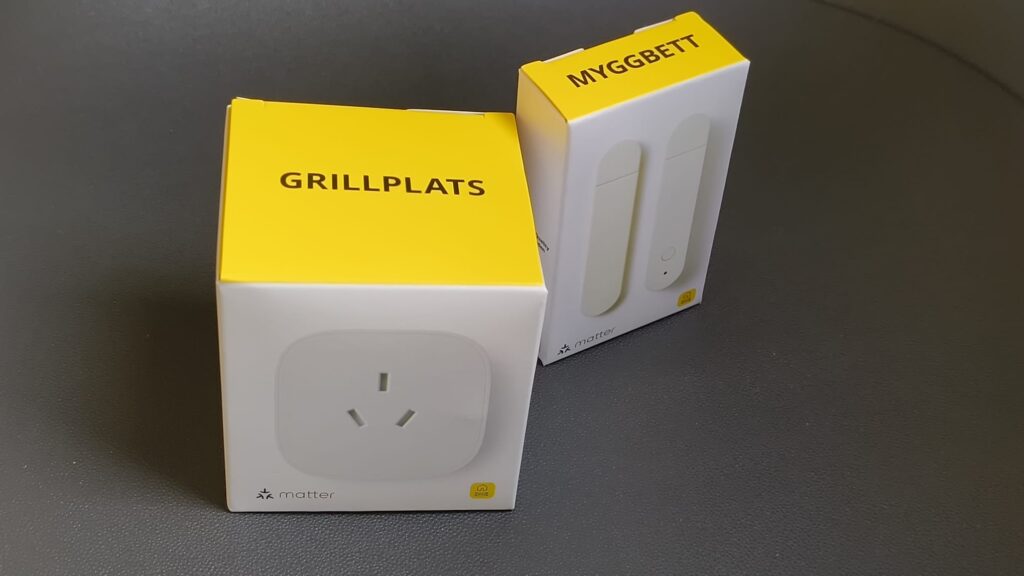
One day I happened to visit the IKEA store, I saw that they are selling some cheap home automation sensors using Matter application-layer communication standard. Then I had an idea: can I buy a door open/close sensor and install it on a container where I can store my medicines? With this setup, I will get a daily report of whether the container was opened following a set alarm!
Not so fast…
On researching further, I understood that this is not as simple as I thought. Let me list the important learning.
- Home automation sensors using the Matter communication standard need a Thread IPv6-based mesh networking protocol.
- To connect the Thread mesh networking protocol to my home intranet, we need to buy a border router. Although IKEA sells a border router, to take the complete control of the Thread network, it is better to buy the Home Assistant Connect ZBT-2 from Nabu Casa, the company behind Home Assistant.

- The underlying admin dashboard can be a Home Automation App running on a self-hosted server, or a Home Automation OS (HAOS) that runs on a virtual machine.
- A Home Assistant Companion Android app on the mobile phone will be used to register the door open/close sensors.
Parts List
To build the Smart Pillbox, I did the following:
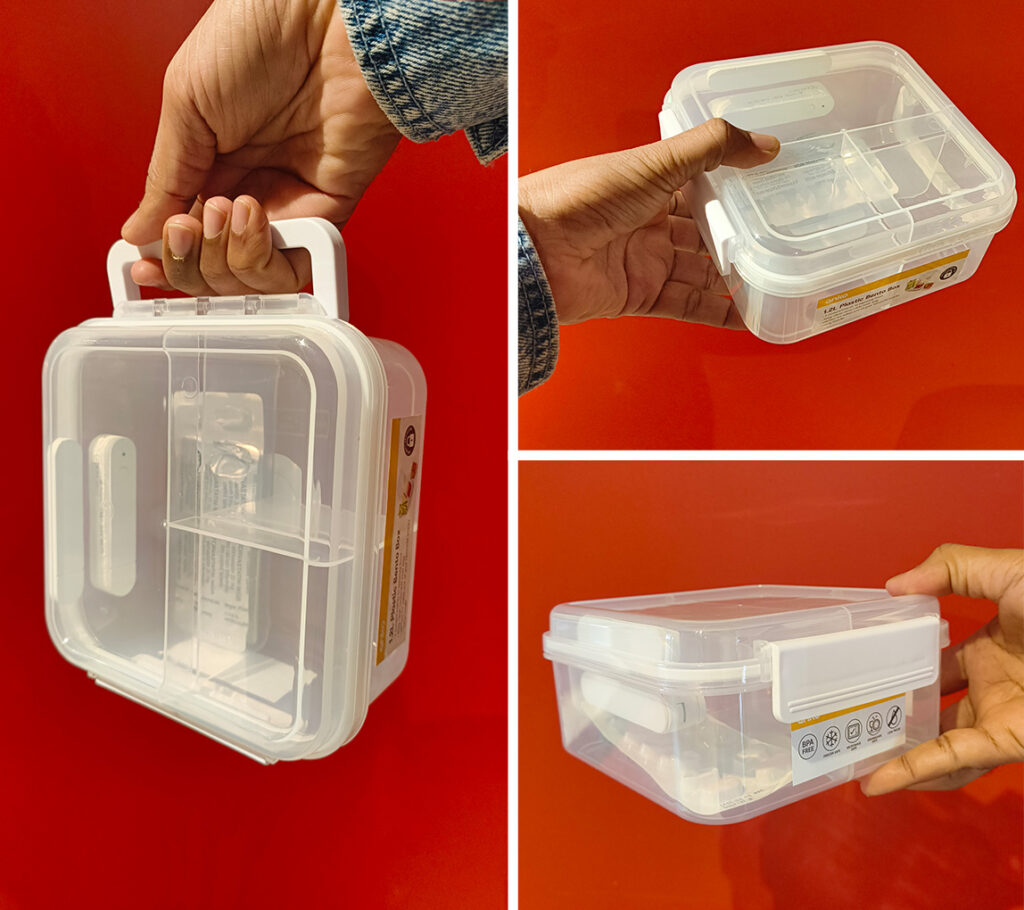
- I bought the IKEA Door Open/Close sensor MYGGBETT for A$15.
- I bought an Anko 1.2L Plastic Bento Box from Kmart for A$4.
- I bought Home Assistant Connect ZBT-2 Border Router from Smart Guys for A$99.
- Since I have a Network Attached Storage device running TrueNAS Community Edition OS, I spun a virtual machine and installed Home Assistant OS (HAOS) on it. TrueNAS supports virtualization natively, so setting up a VM is just a click of a button.
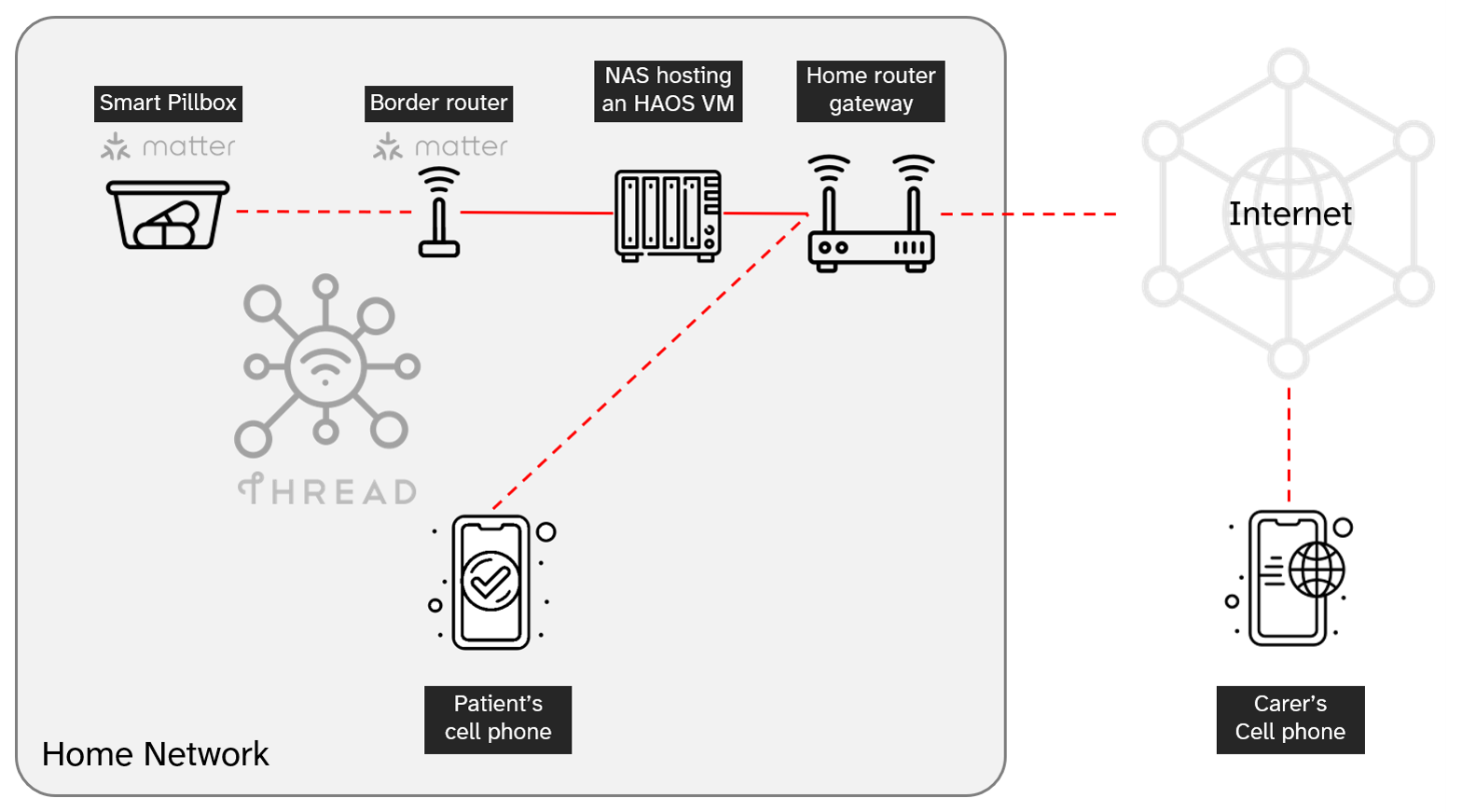
Click on the image for a larger view (Opens a new window).
How my Smart Pillbox Works
Today I’m not going to explain the boring technical bits of installing and configuring Home Assistant OS, registering IKEA door open/close sensor for the Smart Pillbox. But here is how everything works.
- I need to take my pills daily after my dinner — any time between 5:30 PM and 8:30 PM (also after breakfast — any time between 5:30 AM and 8:30 AM). So this is saved as an ‘Automation’ — with trigger, conditions and action.
- Helpers (Boolean flags) are defined to retain the current state of the pillbox — whether the lid is open or closed.
- A push notification is configured to be sent to my mobile phone if the pillbox is not opened in the specified duration.
- A persistent notification on the Home Assistant Companion app is also configured which will appear on the app ‘Notifications’ menu.
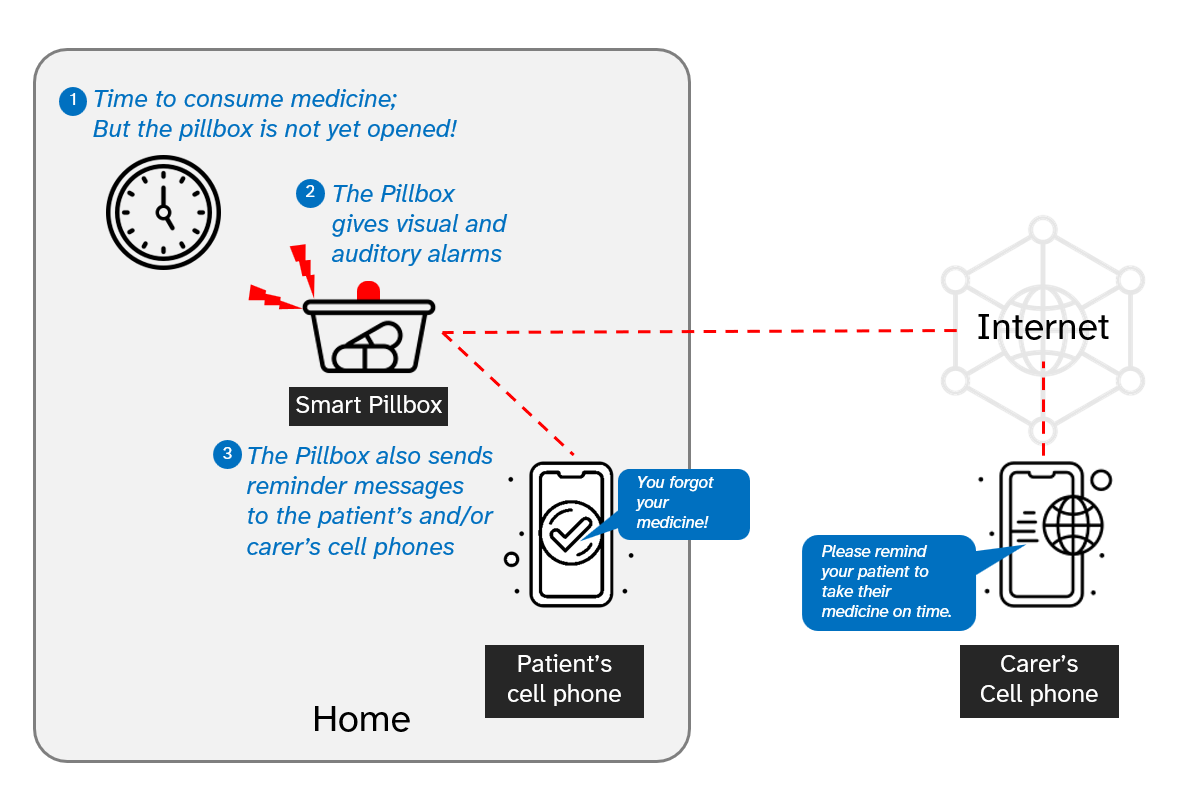
Click on the image for a larger view (Opens a new window).
- If I haven’t opened the pillbox within the specified duration, I will receive a reminder on my mobile phone as a push notification.
- Tapping the notification opens the Home Assistant Companion app’s notification screen — showing the message reminding me to take the pills.
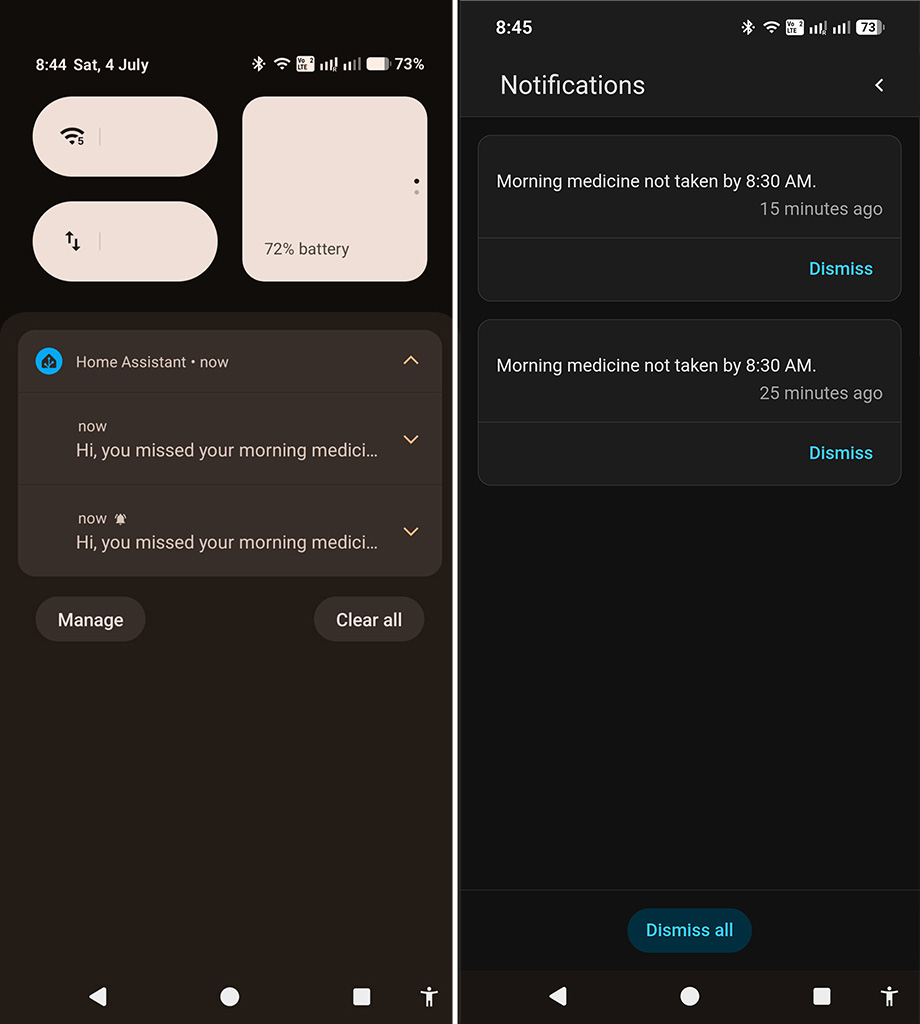
- If I ignore it and don’t open the pillbox, I will get a second reminder after 10 minutes.
- If I open the pillbox and consume the medicine, no notifications are sent — but the lid open/close activity is recorded on the companion app.
UPDATE 04-JULY-2026
It is observed that even though the Smart Pillbox is generating reminders correctly, I’m not getting real time notifications on my Android mobile phone. On further research, I came to know that Android OS controls background running of processes by third party apps to get more battery life after each recharge. There are settings to bypass this, but the mobile manufacturer (like Samsung or Motorola) makes this hard to enable.

One option is to deliver the notifications as an email to your Gmail ID. Since the Gmail app is from Google, Android OS ensures that real time notifications work for it. Another option is to configure integrations with a messaging app — like WhatsApp or Telegram.
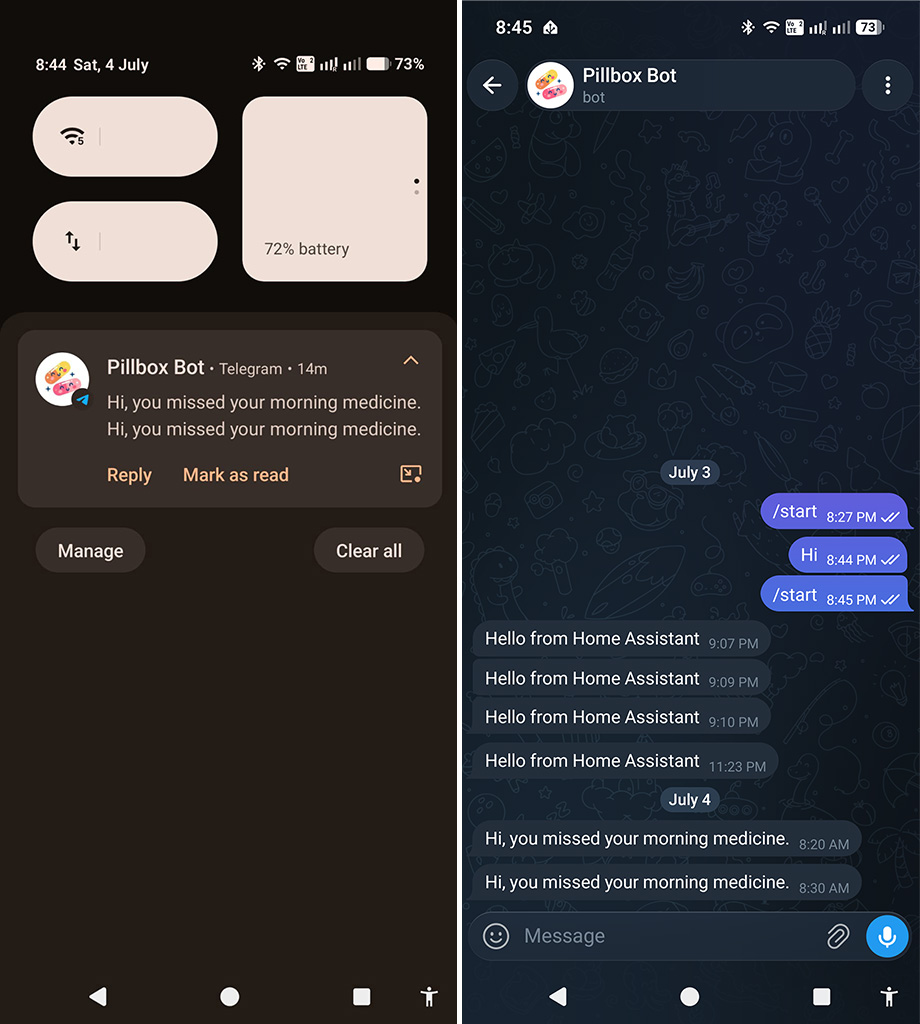
Creating a tailored chat bot and configuring Telegram integration on Home Assistant OS is very easy and popular. So I created a ‘Pillbox Bot’ and now I always get real time notifications on Telegram — irrespective of whether my Android Phone is screen locked or sleeping.
The Future of Smart Pillbox
The current prototype was fun to build and works perfectly for me. But if someone wants to build a similar Smart Pillbox, the setup is very difficult for a normal user who just has a home WiFi network. Also, you need an IPv6 Thread network, a border router, and Home Assistant OS/App configuration. So, what if I can make a Smart Pillbox ensuring an excellent out-of-the-box experience (OOBE) with minimum setup and no extra hardware (like the border router)?
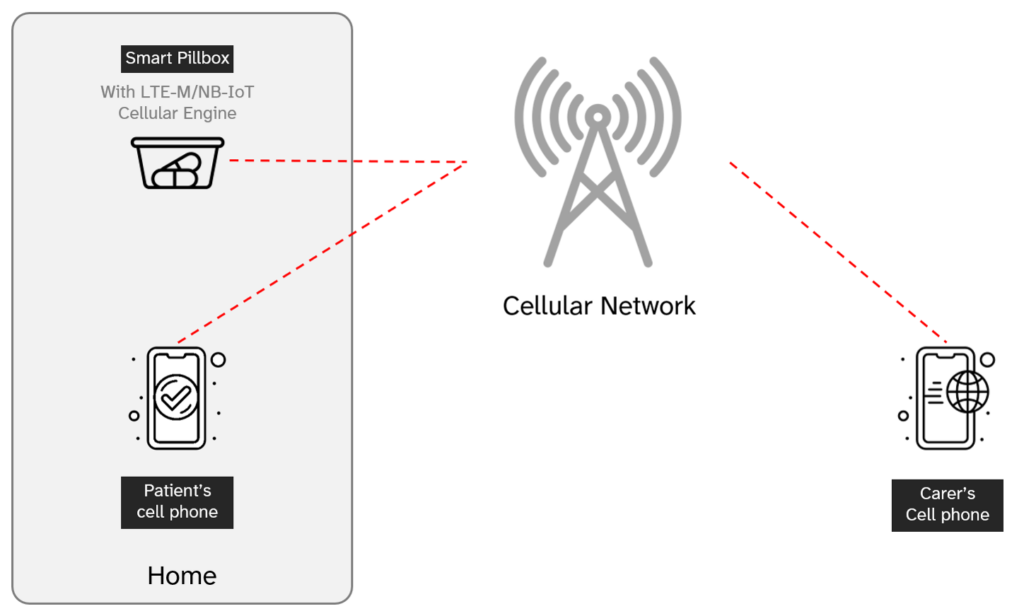
I’m planning to build a new prototype with a cellular engine (LTE-M/NB-IoT Modem) at heart. A Smart Pillbox with an eSIM configured with a cellular network provider should solve the problems of connectivity and setup. I will post an update as soon as I finish this 2.0 build.
Watch this space…
References
- Sauber-Lab UK: Let’s Install Home Assistant OS on TrueNAS Scale to get all the functionality of Home Assistant
- Home Assistant Community: Installing HAOS in a VM on TrueNAS CE
- Home Assistant Alternative Installation: Install Home Assistant Operating System
- TrueNAS Documentation Hub: Setting Up a Network Bridge
- MajorNetwork.net: Home Assistant Was Unable to Add IKEA Matter Devices
Resource used in this design
Aching young blonde ill slavic man wearing winter hat and scarf by StockKing: Magnific